Recipe - GitHub webhook integration
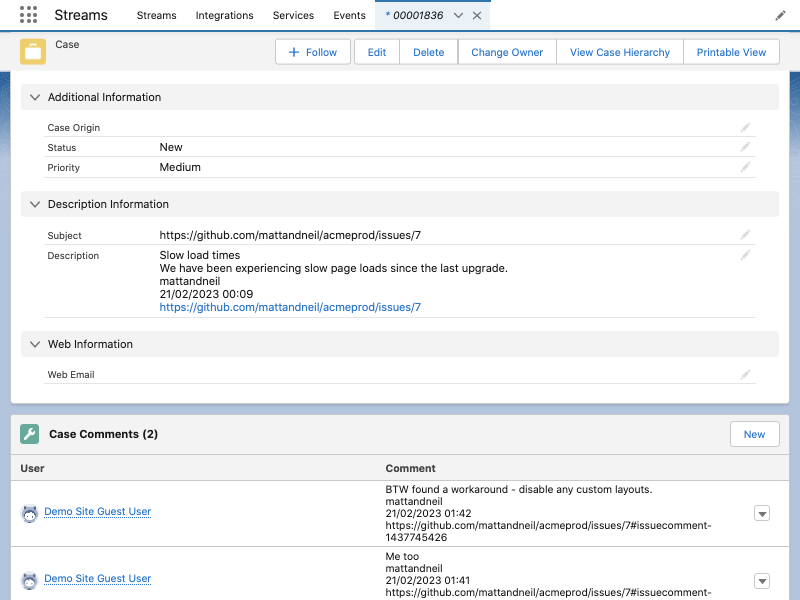
This recipe uses webhooks to link GitHub issues with Salesforce cases. The video covers the integrations tab, how the webhook endpoint works, and catching the payload.
Read on to see how the JSON payload is read and returned as SObject data. Each GitHub issue is stored as a case, and issue comments are mapped to case comments.
# Streamscript
$request = Json-Decode $Webhook.request

# Case record
if ($request.issue)
{
    $Case = New-Case
    $Case.Subject = $request.issue.html_url
    $Case.Description = $request.issue.title
    $Case.Description += "\n" + $request.issue.body
    $Case.Description += "\n" + $request.issue.user.login
    $Case.Description += "\n" + $request.issue.created_at.format()
    $Case.Description += "\n" + $request.issue.html_url
}

# Case Comment records
if ($request.comment)
{
    $CaseComment = New-CaseComment
    $CaseComment.CommentBody = $request.comment.body
    $CaseComment.CommentBody += "\n" + $request.comment.user.login
    $CaseComment.CommentBody += "\n" + $request.comment.created_at.format()
    $CaseComment.CommentBody += "\n" + $request.comment.html_url
    $CaseComment = [$CaseComment]
}

return -record $Case -records $CaseComment
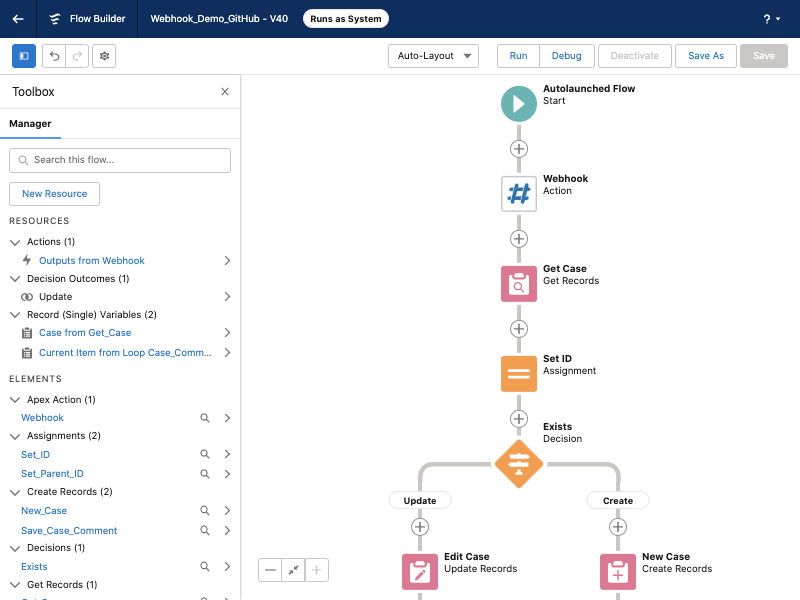
Run flow in System Mode so the Site Guest User works. It can query existing records like this:
 |
 |
Note: secure the GitHub webhook endpoint by verifying the request signatures:
# secure compare via custom metadata
$secret = Base64-Encode {!secret_mdt}
$payload = Base64-Encode $Webhook.request
$mac = Hex-Decode $Webhook.requestHeaders.X-Hub-Signature-256.substr(7)
if (!Crypto-Verify-Hmac 'hmacSHA256' $payload $secret $mac) {throw $mac}