Streamscript FAQ
Q: How do I get syntax highlighting and autocompletions?
Use the optional Streamscript Editor extension for Chrome, Edge, Firefox and Safari. It improves the appearance of scripts in flows without affecting script execution. The playground mirrors the same syntax highlighting and autocompletions offered by the editor extension.
Q: Does it support bulkification?
Yes. For record-triggered flows, use the Bulk directive. In bulk mode, Streamscript runs once instead of many times. Inputs or merge fields will contain lists instead of a single value. Outputs or return values will expect lists instead of a single value.
Q: What data types can I use in scripts?
Streamscript supports all the JSON data types: text, number, boolean, list, and map (for records). Any JSON value is already a Streamscript value. Json-Encode a value to produce JSON text '{...}' or use Json-Decode on text to produce a Streamscript value. Dates and times are represented as text, see the data types guide.
Q: How do I make an API call from a Record-Triggered Flow?
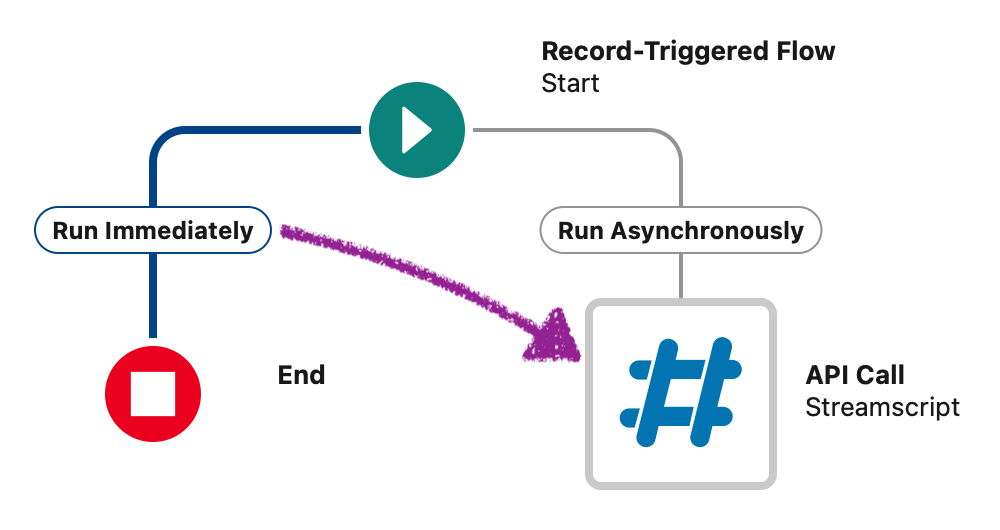 You may encounter this message: "You have uncommitted work pending. Please commit or rollback before calling out". Move the logic from Run Immediately to Run Asynchronously. This works because Salesforce supports HTTP callouts from record triggers when the script runs asynchronously. To process multiple records in one callout (up to 200) consider using the Bulk directive.
Q: How do I get the Run Asynchronously path to show in Flow Builder?
For record-triggered flows, edit the Start element and tick the option "Include a Run Asynchronously path". If the layout is Free-Form, drag the Start connector twice to reveal the async path, or switch to Auto-Layout mode to display it.
Q: How do I set response headers on my inbound webhook?
Use the $Webhook.responseHeaders map variable and avoid reassigning it.
Set values like this: $Webhook.responseHeaders.Content-Type = 'text/html'
Q: How can I send OAuth 2.0 headers in my HTTP callout?
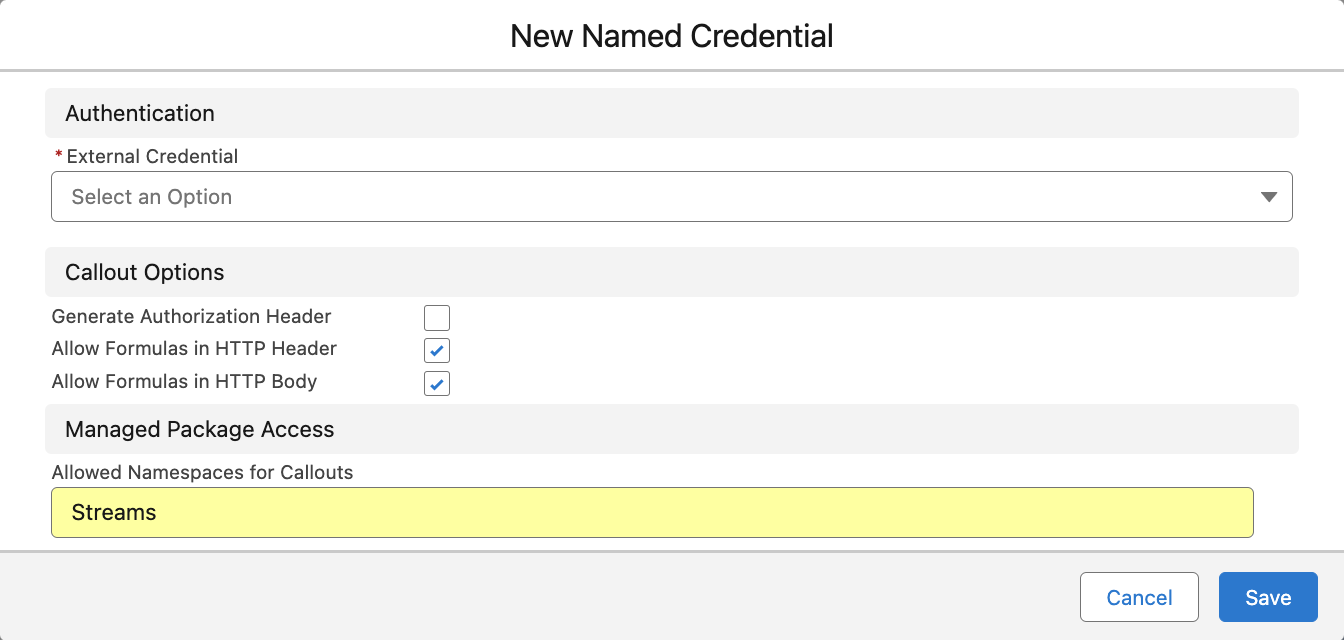 Set up a Named Credential then use it like this:
Http-Post 'callout:My_Cred/path/to/api'
Avoid handling session ids, usernames, passwords or authentication tokens within your logic. If you use External Credentials, set the Managed Package Access to Streams
Q: How to debug Named Credential and External Credential issues?
Check for these common fixes:
"You don't have permission to view this data" - rerun the Named Credential auth flow by click Edit then Save again.
"The callout couldn't access the endpoint" - set Managed Package Access to Streams on the named credential.
"We couldn't access the credential(s)" - set External Credential Principal Access on the running user. The user's profile (or a permission set) must also include Object Permissions > User External Credentials > Read.
Q: Why are percent signs appearing in my named credential string?
URL encoding prepares data for transport over HTTP by converting special characters. If you URL encode a map of parameters, merge fields like {!$Credential.Password} will get encoded too. For example {!$Credential.Password} becomes %7B%21%24Credential.Password%7D. This breaks the credential because Salesforce needs to substitute the actual value before the request is sent. You can avoid this by encoding the other parameters first. Then append the credential value manually so it stays unencoded like this: $body += '&pw={!$Credential.Password}'
Q: How to convert a UNIX epoch timestamp into a datetime?
For seconds: $dt = Datetime-Value $timestamp
For milliseconds: $dt = Datetime-Value $timestamp_ms
Q: Can I access all of the fields on my records?
Yes. Streamscript supports all fields on all objects, including standard, custom, managed, platform events, and custom metadata, wherever the running user has CRUD and FLS permissions.
Q: How do I send URL encoded form data in an HTTP post?
Prepare a map of parameters, then use .toUrl() which converts it to key=val text:
# Post form data
$url = 'httpbin.org/post'
$body = {id: '123', type: 'order'}.toUrl()
$headers = {Content-Type: 'application/x-www-form-urlencoded'}
return Http-Post $url $headers $body
Q: How can my Webhook receive URL encoded form data posted to it?
Read map values from $Webhook.requestParams (the $Webhook.request body will be blank)
# Webhook
return New-Case {
    Subject = $Webhook.requestParams.issueId,
    Description = $Webhook.requestParams.issueSummary
}
Q: How do I get related record fields in a Record Triggered Flow?
Use a query, or create formulas so that the related fields are available on the record:
# Streamscript to get parent record attributes
$Contact = Query-Record 'SELECT Account.Owner.Name FROM Contact LIMIT 1'
return $Contact.Account.Owner.Name
Q: How do I access the results of script in subsequent steps?
One-line scripts automatically return the result. For multi-line scripts, use the return keyword.
When returning records or lists, the variable name must indicate its type, eg: return $Invoice__c
Flow API names are case sensitive: $name__c $Name__c $Name__C are all different names.