Guide - Return values
This follows on from the general concepts in the logs, errors, and outputs guide.
This guide explains how Streamscript actions return both primitive values and record/collection types without the need for Apex code. Streamscript marshals all values into pre-defined output variables based on the data type.
Pull from automatic output values...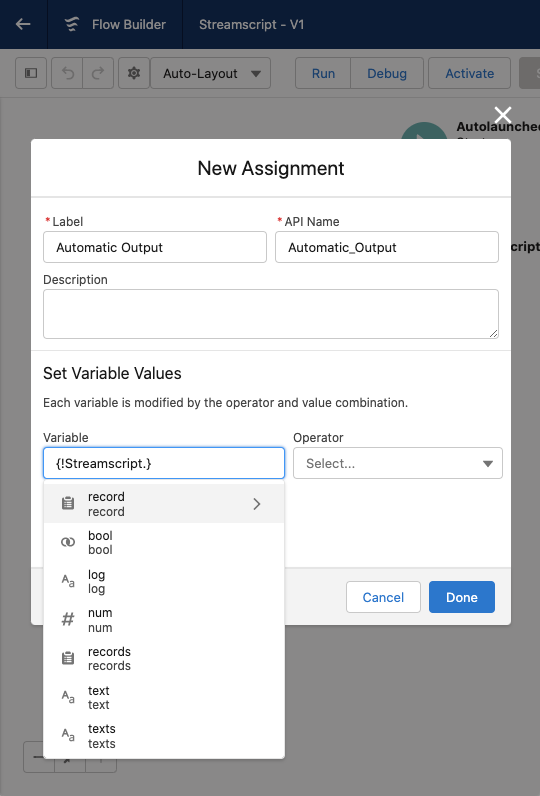 |
...or push into manually assigned variables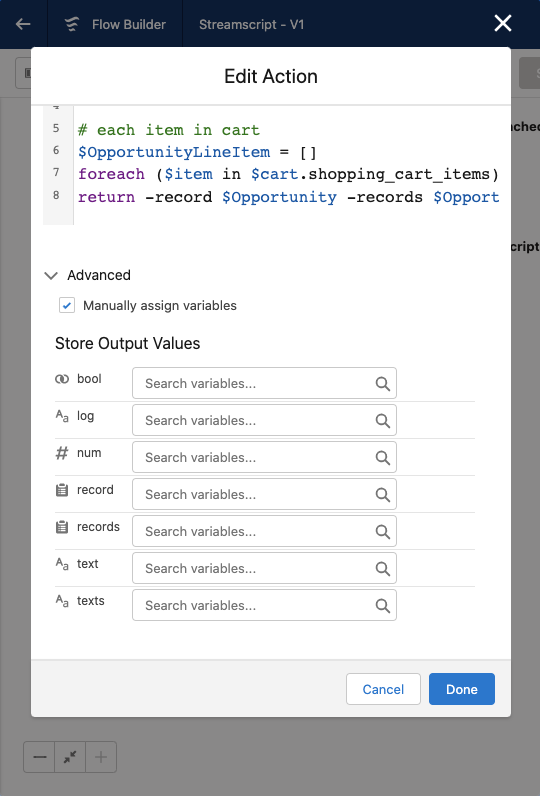 |
Expression Return
Any expression may appear after the return keyword. Streamscript automatically sets the action's output variable (num, bool, text, list, record, records) according to the data type.
# Streamscript (inverse exchange rate)
$result = Json-Decode $http.body
return 1 / $result.rates.USD
Variable Return
Any script variable may be returned as a flow resource, including records and collections.
When returning records and lists, the variable name must indicate its type, eg: return $Account
Flow API names are case sensitive: $name__c $Name__c $Name__C are all different names.
| Streamscript Variable | Flow Resource |
|---|---|
return $num |
Number |
return $bool |
Boolean |
return $text |
Text |
return $texts |
Text Collection |
return $Account # map |
Record |
return $Contact # list of maps |
Record Collection |
Dates, times, datetimes or blobs are returned by assigning to a field of that type on a record. Returning a map is achieved by returning a record with its fields populated, which behaves map-like on the flow canvas.
This example retrieves a PDF invoice. The binary blob is stored on the Document Body field, then it returns the $Document record so that Flow can insert it. The HTTP body is base64 to match the Document body field.
# get pdf binary blob, represented as base64
$url = 'https://www.tryitapi.com/invoice.pdf'
$pdf = Http-Get $url -base64

# new record
$Document = New-Document {
    Name = 'inv.pdf'
    Body = $pdf.body
}

# output as SObject
return $Document
Parameterised Return
Instead of one variable, you may simultaneously return any/all of the above variables. This example returns an Opportunity header and a list of OpportunityLineItem simultaneously:
# shopping cart
$Opportunity = New-Opportunity
$Opportunity.Name = $cart.shopping_cart_name

# each item in cart
$OpportunityLineItem = []
foreach ($item in $cart.shopping_cart_items) {...}
return -record $Opportunity -records $OpportunityLineItem
Another example - issue a POST request and return the HTTP response attributes to flow:
# Streamscript
$Http = Http-Post 'callout:httpbin/post'
$body = $Http.body
$status = $Http.status
$headers = $Http.headers.values()
return -num $status -text $body -texts $headers
Parameterized return values must be either literals or $variables. If you wish to return a long reference such as $map.value.text, assign the final value to a distinct $text variable, prior.
Null Return
Returning a value from a script is optional. Scripts that return nothing are said to return null. There is no value, but the script ends and flow proceeds to the next element.
# Streamscript
if ($record_already_exists) return
...
Implied Return
One-line scripts automatically return the result of the expression. Streamscript will set the output variable (num, bool, text, list, record, records) according to any result data type.
# Streamscript (returns boolean)
BusinessHours-IsWithin 'Eastern Standard Time' {!$Flow.InterviewStartTime}
That sums up the ways to pass data from Streamscript back into Flow.